
 Chrome extension · Free
Downloads that finish faster, and never start over.
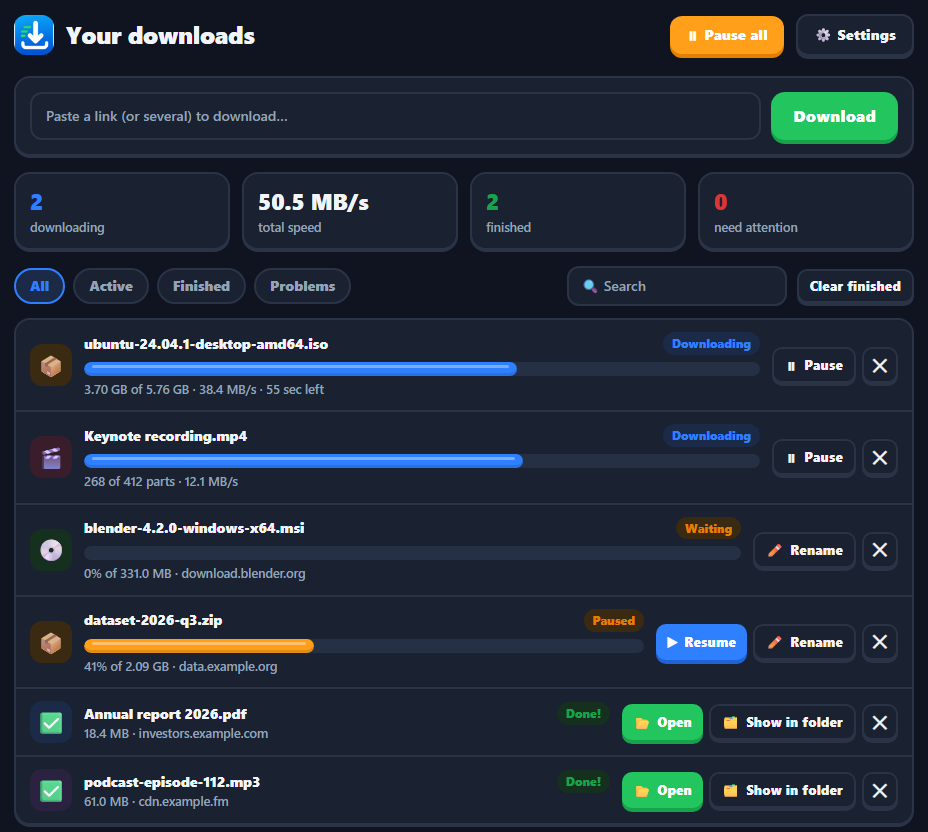
Download That splits big files across several connections, pauses and resumes without losing progress, and grabs the video or audio on any page in one click. A real download manager, inside Chrome.
Coming soon to the Chrome Web Store.
Set it and forget it
Start a download
Click a link, the Download button on a video, or the toolbar badge that counts media on the page.
It goes to work
The file is split across several connections. When one finishes early it takes over part of the slowest.
Open it
Files land in tidy folders by type. Open them or show them in the folder, straight from the manager.
Built for big files and bad connections.
Accelerated
Segmented downloads over parallel connections, with dynamic splitting so no connection sits idle.
Pause and resume
Finished pieces stay on disk, so downloads pick up where they stopped, even after Chrome restarts.
Video and audio
Detects MP4, WebM, MP3 and HLS streams on the page, picks the best quality and saves them in one click.
Queue and scheduler
Choose how many run at once, cap your bandwidth, or start the queue overnight.
Link grabber
Find every file link on a page, filter the list, tick what you want and download it all.
Survives bad networks
Failed pieces retry on their own. Expired link? Paste a new one and keep the finished parts.
Download That Desktop Pro
A companion app for the sites a browser extension can't handle, and for AI agents. Desktop is in early preview; new installs get a 7-day Pro trial.
More sites
Video from YouTube and more than 1,000 other sites, in up to 4K or as MP3, saved to your Downloads folder.
For AI agents
Claude and other agents that speak the Model Context Protocol can queue downloads for you, on your own computer.
Questions, answered.
Does it work on YouTube?
Not in the extension. Chrome Web Store rules don't allow it, so on YouTube the extension points you to Download That Desktop instead.
Can it download protected streaming video?
No. DRM-protected streams (Widevine, FairPlay and similar) are refused on purpose. Only download content you have the right to download.
Does it send my downloads or history anywhere?
No. Files come straight from the website to your computer. The extension doesn't send us anything. See the privacy policy.
How do I get help?
Email support@wyntonsoftware.com with the page you were downloading from.
Download That is coming to the Chrome Web Store.
Want to know the moment it's live, or try it early? Drop us a line.
Request early access →